Adkins Powder Recirculation - Maintenance
This article will explain how to maintain the powder recirculation system in your Adkins Inline.
It will also explain how to change the bearings, refit the washers and bearings correctly, remove the powder screws, access the chambers, and remove the powder trough.
.
Along with physical maintenance, updating to the latest firmware is the best way to help to maintain and protect your powder recirculation system.
For information on how to get the most out of your powder recirculation system, please see our Powder Recirculation Usage Guide
If you are experiencing problems with your powder recirculation system, please see our Powder Recirculation Troubleshooting Article
When working with uncured powder adhesive, you should always wear appropriate PPE including face and hand coverings as advised by the manufacturer of the powder adhesive.

TABLE OF CONTENTS
Inline 900 ProInline 900 Pro
Preventative Maintenance
Preventative maintenance is the best way to prevent downtime due to issues with the powder recirculation system. Small changes can be made to daily routines to help keep the powder free from lumps and prevent moisture absorption.
Firmware update
The Adkins Inline 900 Pro should be updated to firmware version 1891. This ensures that the powder recirculation screws operate to prevent powder compaction and powder congealing or melting inside the system.
If your 900 Pro is not running the latest firmware, you can contact your Adkins Dealer for help updating to 1891.
Ensure powder is recirculated during daily Heat Cycle
During the daily maintenance Heat Cycle the lower powder recirculation screw should be turning to help keep powder in the powder hopper rather than in the powder trough. If the lower recirculation screw or powder pick-up screw isn't turning, you can activate "Shaking" on the control panel. This should activate them and recirculate powder into the hopper where is can be maintained effectively.
Intermediate Maintenance
Intermediate maintenance should be carried out if you are experiencing problems with the powder recirculation system. Whether the system is making an abnormal noise, a screw isn't turning when it should, or you notice lumps of foreign objects in the powder.
Emptying powder from the system
The majority of powder can be removed from the system without removing any major components. This can be done to change the powder, to refresh the powder, to transport the machine, or to clean out the powder trough.
Emptying powder from the dusting bar
The easiest way to get the majority of powder out of the system is to catch is straight out of the dusting bar. To do this you need a watertight container able to carry up to 2L (based on the maximum recommended powder in the Adkins Powder Recirculation - Usage Guide) or you can use 2x 1L watertight containers/bags.
Place the container underneath the centre of the dusting bar with the opening placed under the powder shortage sensors.
Make sure that this is not sitting in the powder weight trough as the machine will stop dusting when this reaches 50.
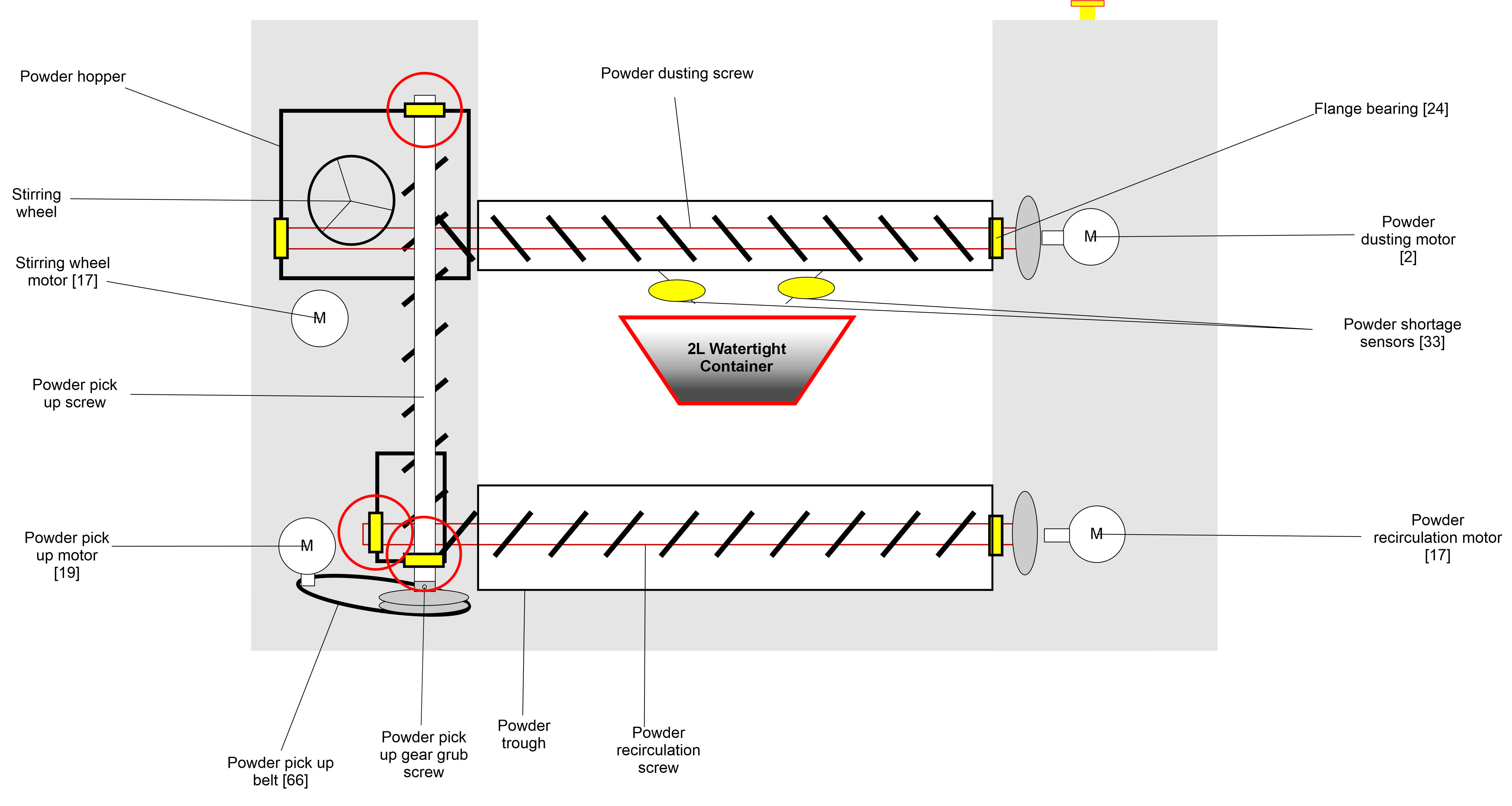
Place the machine in "Manual" mode and activate "Dusting".
The machine will now dust as much powder as possible into the container so that it can be removed from the machine.
You can also move any stubborn powder in the powder trough and powder hopper using the long metal plate supplied with the machine to knock the powder into the path of the screws.
Once powder has stopped falling, remove the container and turn dusting off.
This method alone won't completely remove the powder from the system as it won't be able to lift the powder from the pick-up screw and may leave remnants in the powder trough or hopper.
Removing powder from the recirculation screw
To remove powder from the recirculation screw, open the cover underneath the powder hopper and locate the sealing bracket. Fit the supplied powder container and remove the 4x screws holding the plate on.
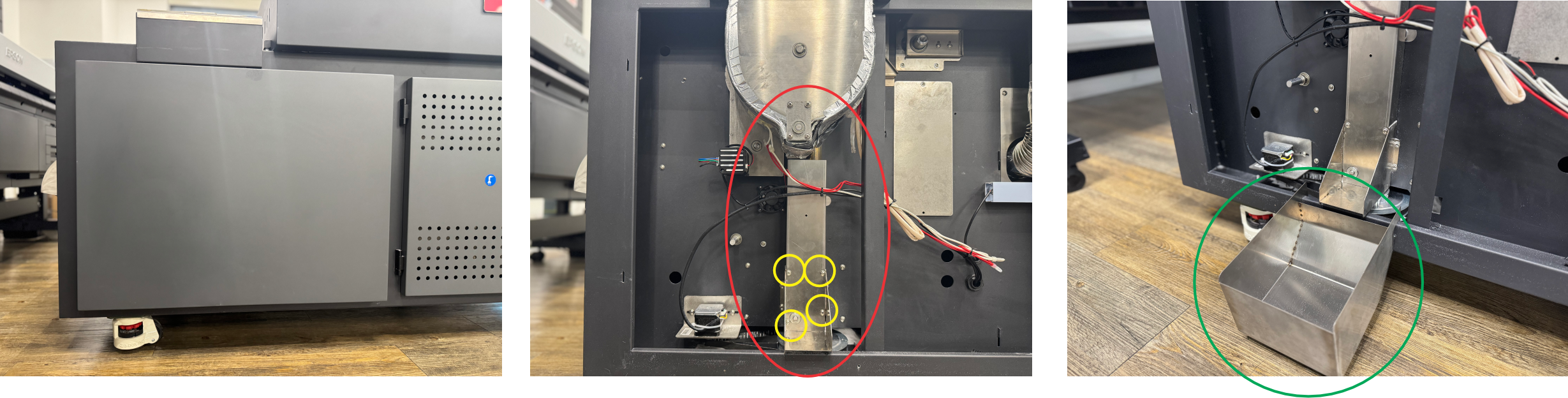
You can then manually move the powder from the machine into the powder container.
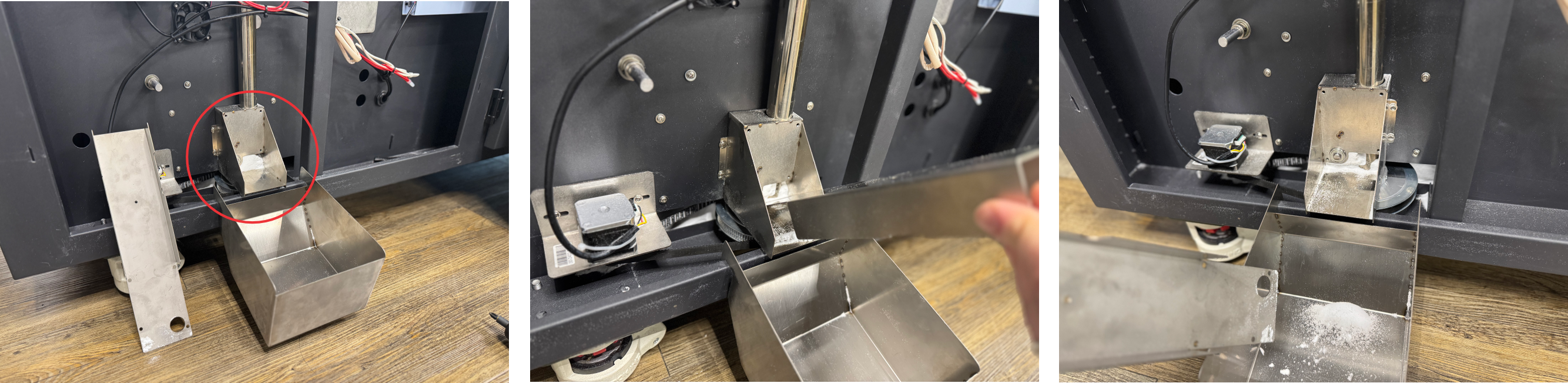
Removing the powder screws
To safely carry out repair work on the machine, the power source should be removed and all power expelled from the machine.
The powder recirculation screws rely on bearings to turn freely and sealing washers to protect the bearings. The spiral screw blades are individual components that can be replaced individually if required. Note: the dusting/recirculation and lifting spiral blades are different.
19x8mm Flanged Bearing - XP1354FB198
Felt Pad Sealing Washer - XP1354FP
Dusting Spiral Blade - XP1354PDS
Lifting Spiral Blade - XP1354PLS
Removing the powder pick-up screw
Remove the side panel below the powder hopper by removing the screw in the centre of the bottom lip and push the cover down then slide it away from the machine. Then, using a 3mm Allen key, remove the 4 bolts holding the powder hopper cover. Lift the powder hopper cover away.
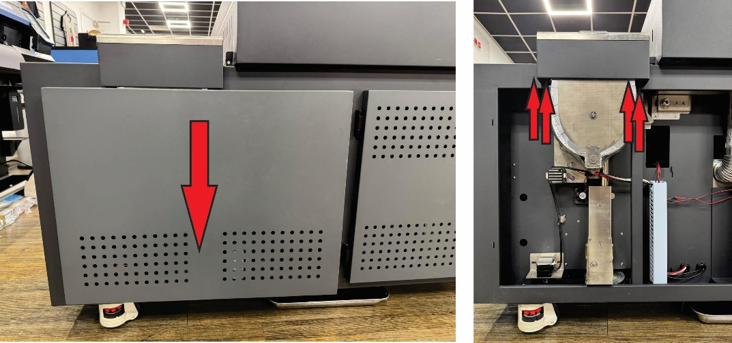
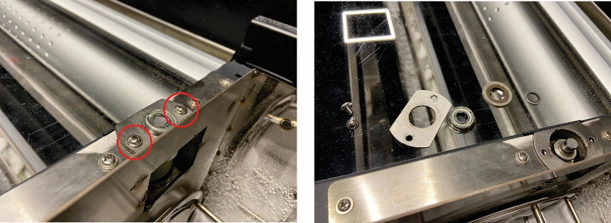
Locate the top of the pick-up screw. Remove both screws holding the bearing plate to the machine. Remove all of the components on top of the screw and store them safely. You should have the bearing, sealing washer, small washer, and the bearing plate with screws.
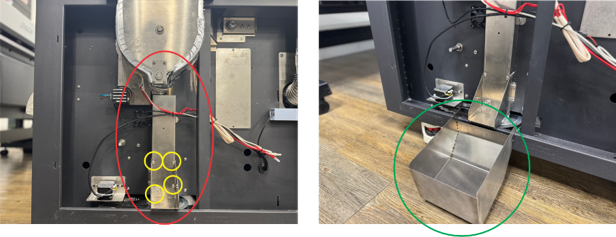
Fit the powder container shown in green underneath the powder screw bracket as shown. Remove the screws shown in yellow to remove the cover shown in green. You should then remove the powder that you can see.
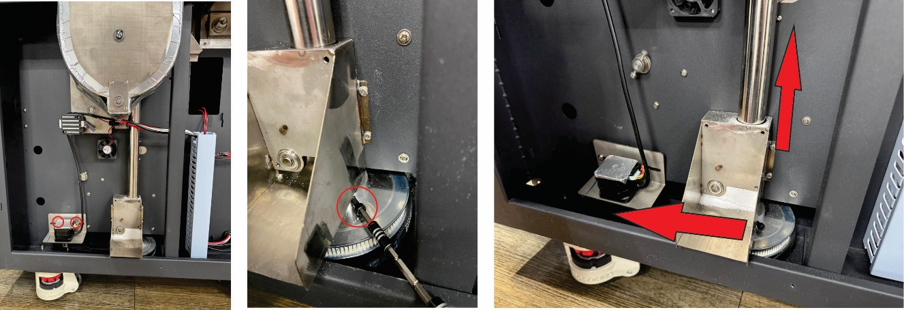
Remove the motor and the lower gear by removing the 2 screws and the 2x 4mm Allen key bolts (these may be 2/2.5mm set screws on earlier models) shown in red. Pull the pick-up screw chamber up slightly. Then slide the lower gear out to the left.
Remove the pick-up screw chamber completely; as you pull, powder is likely to drop out of the opening at the bottom of the screw. This should be cleaned before re-fitting. Remove the pick-up screw from the chamber, along with the sealing washer and the bearing.
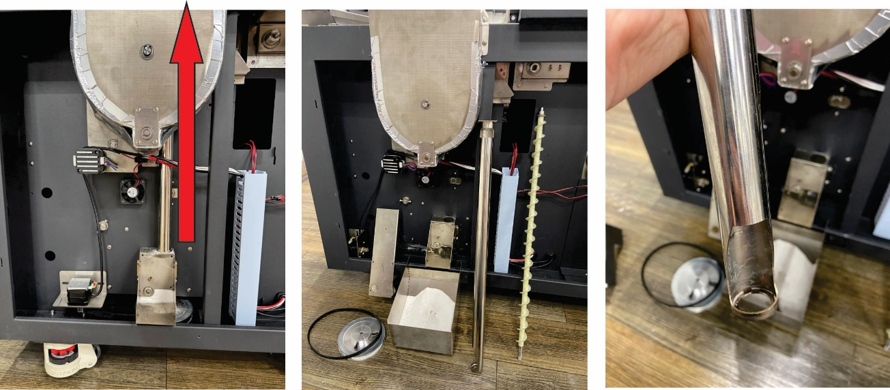
If there is glue residue inside the chamber or on the screw blades, this should be cleaned. Spin the bearing by hand to make sure it is not seized; if there is any resistance replace it.
Removing the recirculation screw
Open the cover underneath the touch screen and locate the recirculation screw motor. Remove the 2 screws to remove the motor from the machine.
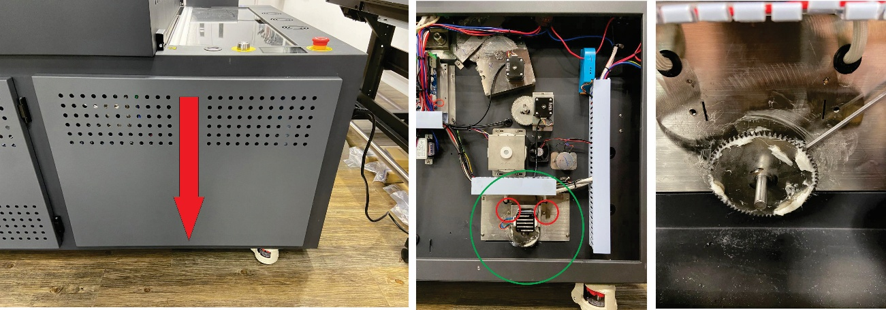
On the back of the gear, locate the 2x 2mm Allen key set screws that are holding the gear in position on the screw. Undo these slightly, not all the way, to loosen the gear and remove it.
You will now see the bearing, bracket. Remove the 2 screws holding the bracket in place then remove the bearing. Test the bearing, if it isn’t completely free to turn by hand, replace it.
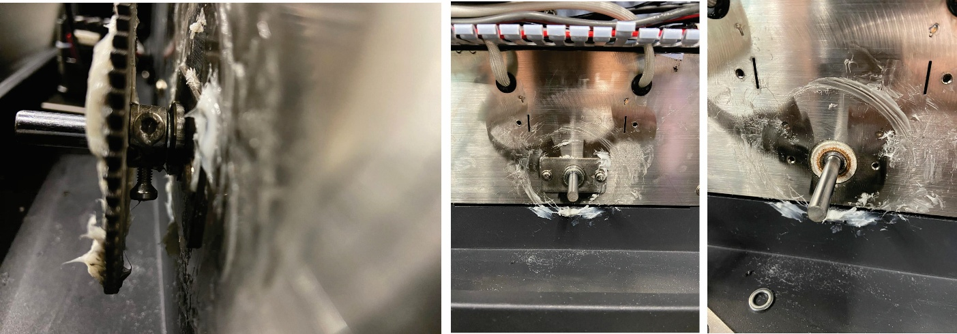
On the other side of the machine, gently pull the whole screw out. This will reveal the bearing and washer.
Slide the bearing and sealing washer off the end of the screw. Test the bearing, if it isn’t completely free to turn by hand, replace it.
You can then remove the powder from the powder trough by brushing it out of the side of the machine that has the powder container fitted. Alternatively you can use an appropriate vacuum cleaner to remove the powder.
Removing the dusting screw
Remove the cover underneath the powder hopper and locate the square bracket at the bottom of the powder hopper. Remove the 4 screws holding it in place.
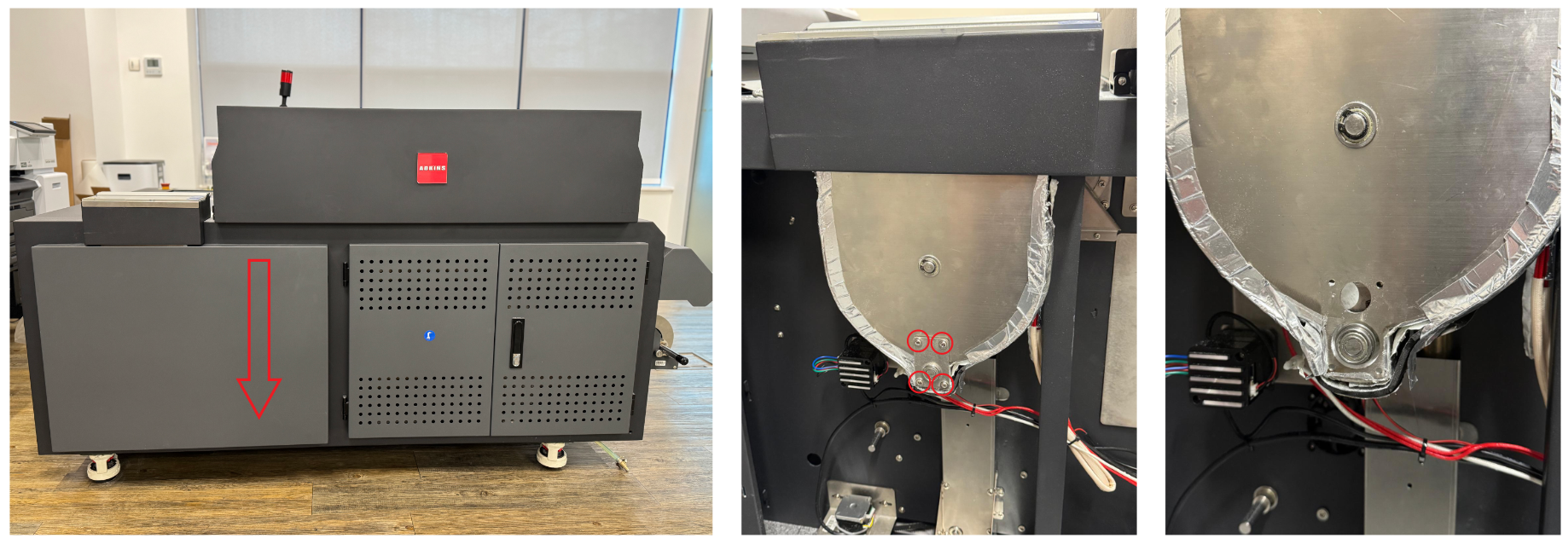
Open the cover underneath the touch screen and locate the dusting screw motor. Remove the 2 screws to remove the motor from the machine.
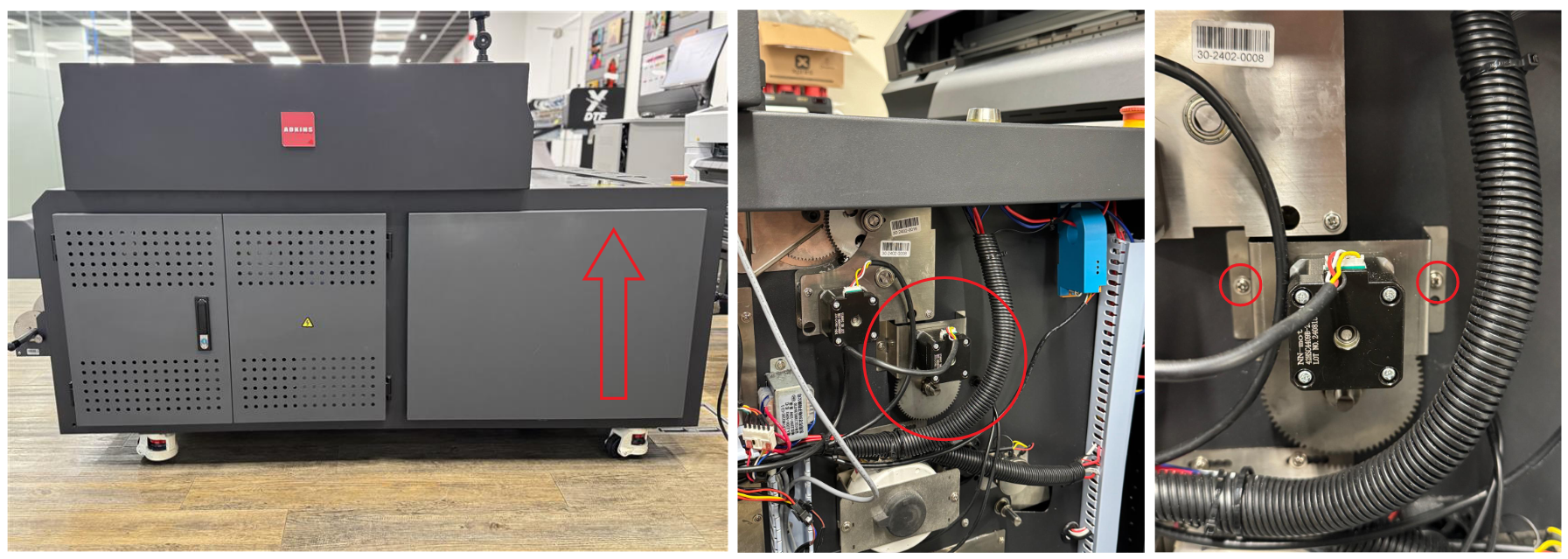
On the back of the gear, locate the 2x 2mm Allen key set screws that are holding the gear in position on the screw. Undo these slightly, not all the way, to loosen the gear and remove it. You will now see the bearing and the end of the screw. The screw should push out of the other side of the machine.
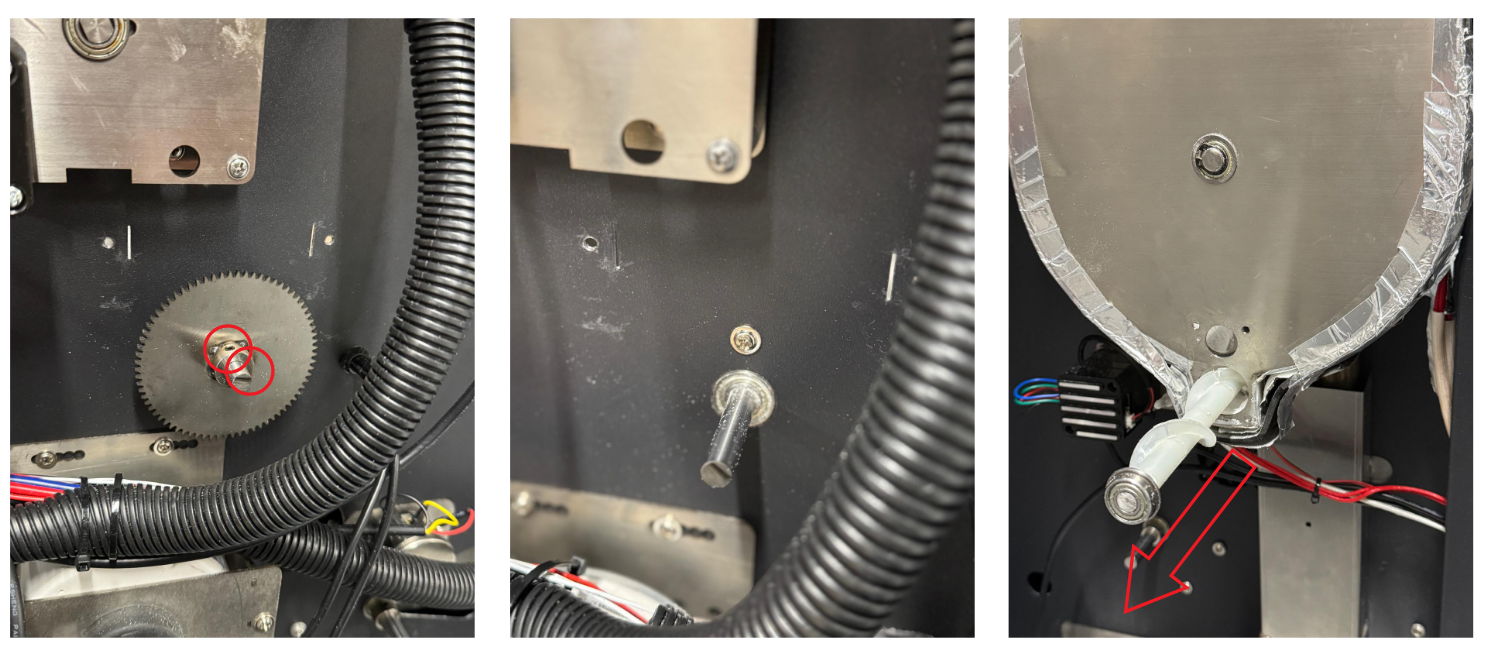
Remove the screw completely and test the bearings on each end. If there is any sign of resistance, the bearing should be replaced.
Was this article helpful?
That’s Great!
Thank you for your feedback
Sorry! We couldn't be helpful
Thank you for your feedback
Feedback sent
We appreciate your effort and will try to fix the article