Adkins DTF Calibrations
Adkins DTF curing units have 2 sensors that should be calibrated on installation, after a firmware update, for technical diagnosis, or component replacement. This is to ensure that the reading they are giving is correct and accurate to the expected output.
The firmware uses the results of these 2 sensors to ensure the transfers are fully cured with the correct amount of powder applied.
TABLE OF CONTENTS
Powder Weight Sensor
The Adkins DTF curing units monitor the weight of the powder sitting on the film as it passes through the oven. This weight value (0 - 100%) is then used (in conjunction with other parameters) to tell the system when to feed the film through the tunnel when in automatic mode.
It is therefore important that the weight sensor is working and can detect when the right amount powder is applied to the film.
The onscreen display shows the weight value next to the 'Powder' option.
You may find that the powder reading doesn't match the amount of powder on the film and the sensor needs to be recalibrated.
To calibrate your powder weight sensor, you should use a weight of 0.2kg (200g)
Tension Gravity Sensor
The Tension Gravity Sensor is altered by the movement of the Tension Bar just in front of the Take-Up Roller. The Tension Bar will lift when the film is webbed up to the Take-Up Roller and the "Roll" function is active. Once the Tension Bar lifts, the Tension Gravity Sensor will signal the control board to recognise that the machine is now in full-auto mode.
You can test that the Tension Gravity Sensor is working correctly by observing the machine when it is in the Initial and Highest position.
Inline 800 / 900 Pro (Moving belt models)
When the machine is in "Auto" mode with "Feed" activated, the mesh belt should be moving towards the take-up roller.
When the Tension Bar is lifted, the belt should reverse and move towards the printer. If this doesn't happen, you should follow the steps listed below to recalibrate your Tension Gravity Sensor (Roll).
Compact 600 / 900 (Rear vacuum roller models)
When the machine is in "Auto" mode with "Feed" the vacuum rollers should rotate towards the take up roller either consistently or at regular set intervals.
When the rear film sensor is covered and the Tension Bar is lifted, the vacuum rollers should stop rotating until the Tension Bar is dropped again. If this doesn't happen, you should follow the steps below to recalibrate your Tension Gravity Sensor (Roll).
Finding the Calibration Menu
Inline 800
Access the calibration screen by selecting to view the "IO" Menu, then select "?". Then select "Next" 3 times to get to the final page of monitoring notes. From this page, tap the top right corner of the screen and a password entry box will appear.
Input the password "1234" and press "Enter" to confirm.
Compact 600 / 900 / 900 pro
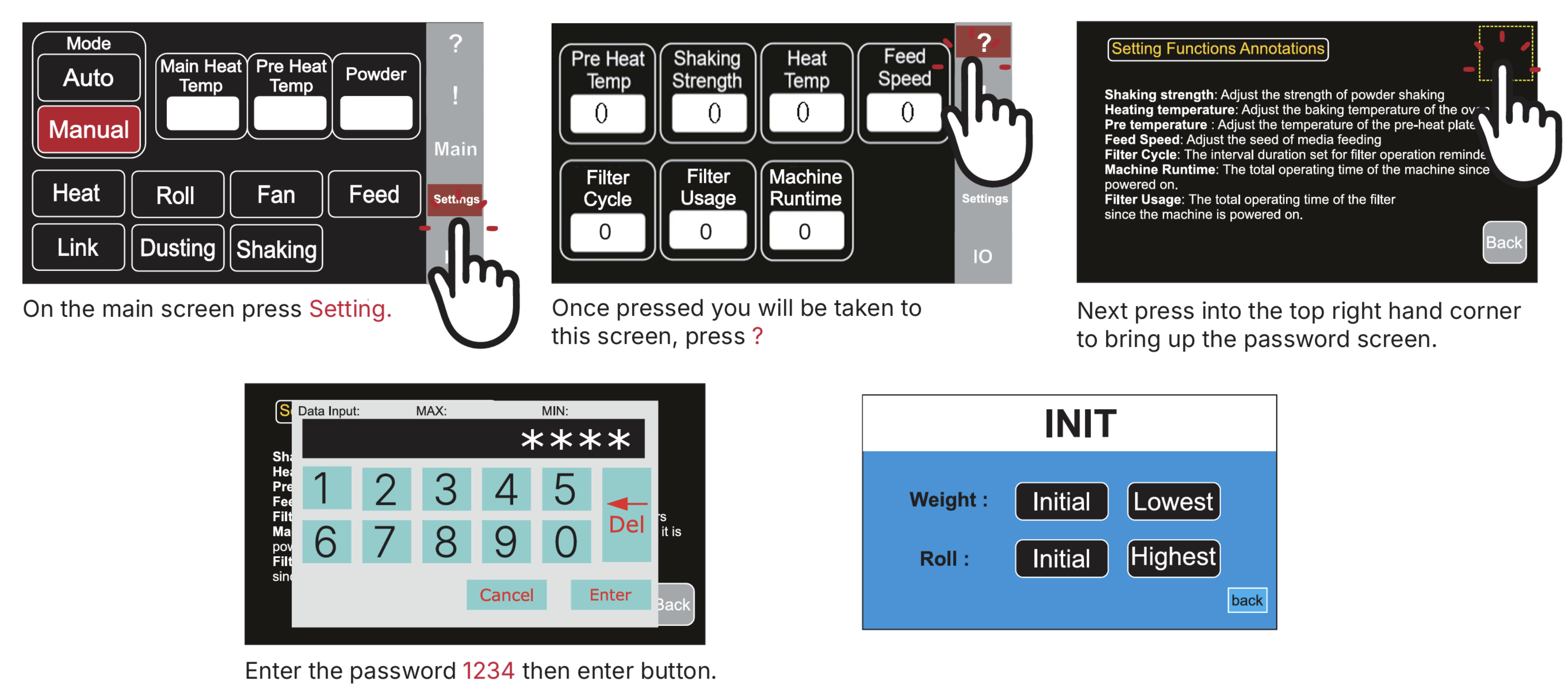
Calibrating the sensors
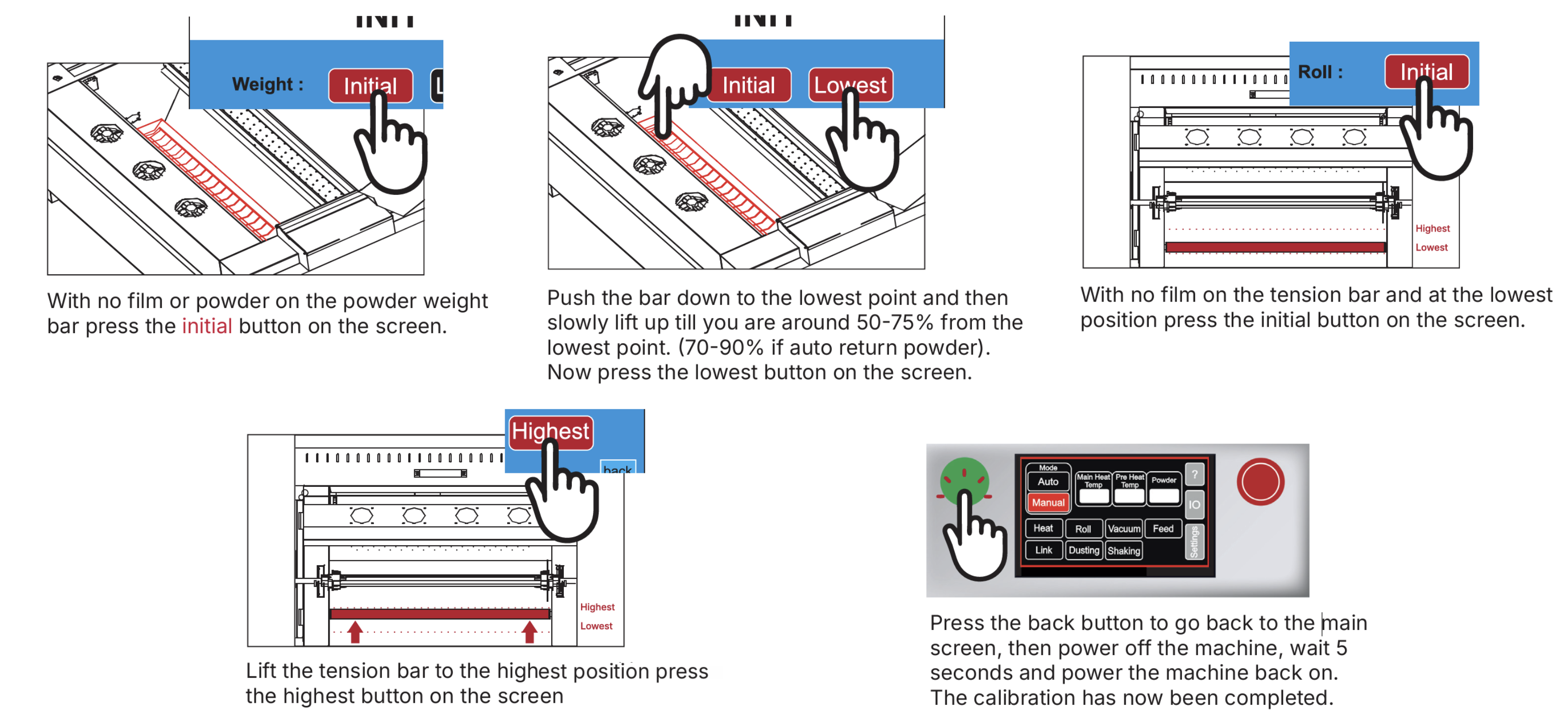
If you are having difficulty in calibrating the sensors or you find one needs replacing, please contact your Adkins Dealer
Was this article helpful?
That’s Great!
Thank you for your feedback
Sorry! We couldn't be helpful
Thank you for your feedback
Feedback sent
We appreciate your effort and will try to fix the article