Adkins Inline Pro - Powder Recirculation Troubleshooting
TABLE OF CONTENTS
1. The powder dusting motor and gear are out of alignment
If the powder pick up motor belt is loose:
If the belt is tight but the powder pick up gear is loose and spins without turning the screw:
3. The powder recirculation motor and gear are out of alignment
Removing the powder recirculation screw
Removing the powder pick up screw
Powder Recirculation System
The powder recirculation system comprises of various components. The best way to resolve an issue is to start by finding the component that isn't working correctly.
Activate Dusting and locate the component(s) that is either noisy or not turning.
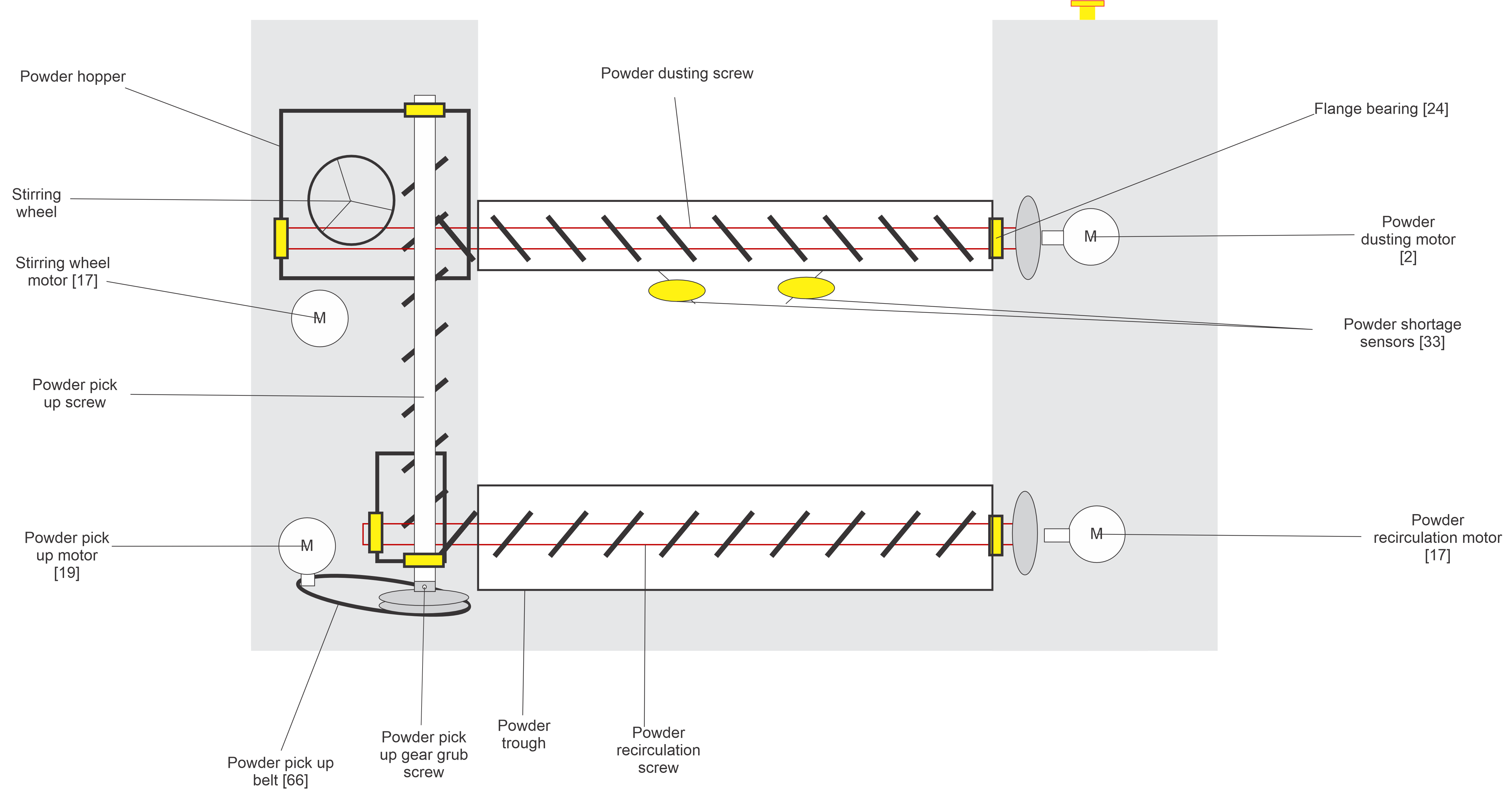
Please use the recirculation graphic below for guidance when the article refers to specific parts. Refer to your User Manual for part codes.
1. The powder dusting motor and gear are out of alignment
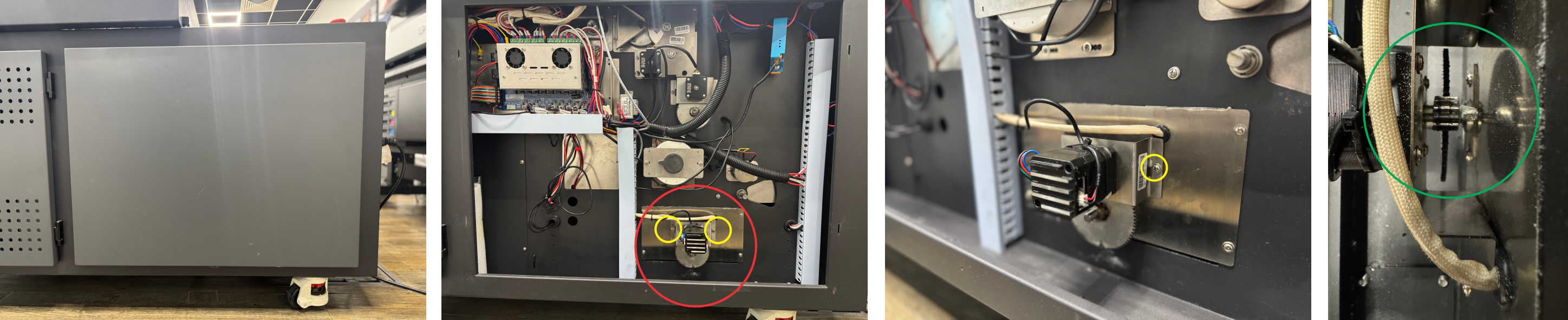
If the motor and gear are misaligned, you may notice the top corkscrew turn sporadically and you may hear a grinding/whirring noise coming from the area behind the touchscreen. You will also find that powder isn't being dropped correctly.

This could be caused by the teeth in the gear being worn or the position of the motor being slightly too far from the gearing.
- Locate the powder dusting motor (circled in red) and the 2 screws (circled in yellow) that hold the bracket to the machine chassis.
- Remove the 2 screws and inspect the teeth on the motor and the gear (circled in green).
- If the teeth are worn then replace either components.
- If the teeth are not worn, hold the motor tight against the gear and refit the brackets so there is less play between motor and gear.
If that does not solve the problem, please see 4. Too much powder is in the recirculation system
2. The powder pick up screw is not turning
If you can't see the powder pick up screw turning from inside the powder hopper, you might find the powder pick up belt has come loose from the gear or motor. This could be due to the powder pick up motor bracket position or the powder pick up gear slipping on the bottom of the powder pick up screw.
If the powder pick up motor belt is loose:
- Unplug the machine and remove the side panel underneath the powder hopper.
- Locate the powder pick up motor and belt.
- Feel the tension on the belt to see if it is taught or loose. You should be able to twist it no more then 180 degrees while the belt is fitted correctly.
- If the belt is too loose you can try adjusting the motor bracket position. Remove the 2 screws holding the bracket in place.
- With the belt fitted around both motor and the powder pick up gear on the bottom of the screw, hold the motor at the furthest point away from the pick up screw, so that the belt is tight, then refit the screws to hold the motor in place.
- Refit the side panel and test
If the belt is tight but the powder pick up gear is loose and spins without turning the screw:
- Unplug the machine and remove the side panel underneath the powder hopper.
- Locate the powder pick up screw gear. On the raised side of the gear you will see 2 holes with a 2.5mm/4mm allen key grub screw in.
- Ensure the powder pick up gear is securely pushed up to the powder pick up screw, then tighten both 2.5mm/4mm allen key grub screws.
- Remove the 2 screws holding the powder pick up motor bracket.
- With the belt fitted around both motor and the powder pick up gear on the bottom of the screw, hold the motor at the furthest point away from the pick up screw, so that the belt is tight, then refit the screws to hold the motor in place.
- Refit the side panel and test
If that does not solve the problem, please see 4. Too much powder is in the recirculation system
3. The powder recirculation motor and gear are out of alignment
If the motor and gear are misaligned, you may notice the bottom corkscrew turn sporadically and you may hear a grinding/whirring noise coming from the area underneath the touchscreen.
This could be caused by the teeth in the gear being worn or the position of the motor being slightly too far from the gearing.
- Locate the powder recirculation motor (circled in red) and the 2 screws (circled in yellow) that hold the bracket to the machine chassis.
- Remove the 2 screws and inspect the teeth on the motor and the gear (circled in green).
- If the teeth are worn then replace either components.
- If the teeth are not worn, hold the motor tight against the gear and refit the brackets so there is less play between motor and gear.
If that does not solve the problem, please see 4. Too much powder is in the recirculation system
4. Too much powder is in the recirculation system
Do not overfill the powder hopper. Ensure that the powder return outlet remains unobstructed and that there is sufficient capacity available within the hopper to accommodate returning powder, as this could cause blockages.
Removing excess powder
If there is too much powder in the system the powder screws may begin to stop turning.
To remove the excess powder without removing any powder screws, you can empty the system using the recirculation screw.
Before beginning, remove any media from the machine and unplug it.
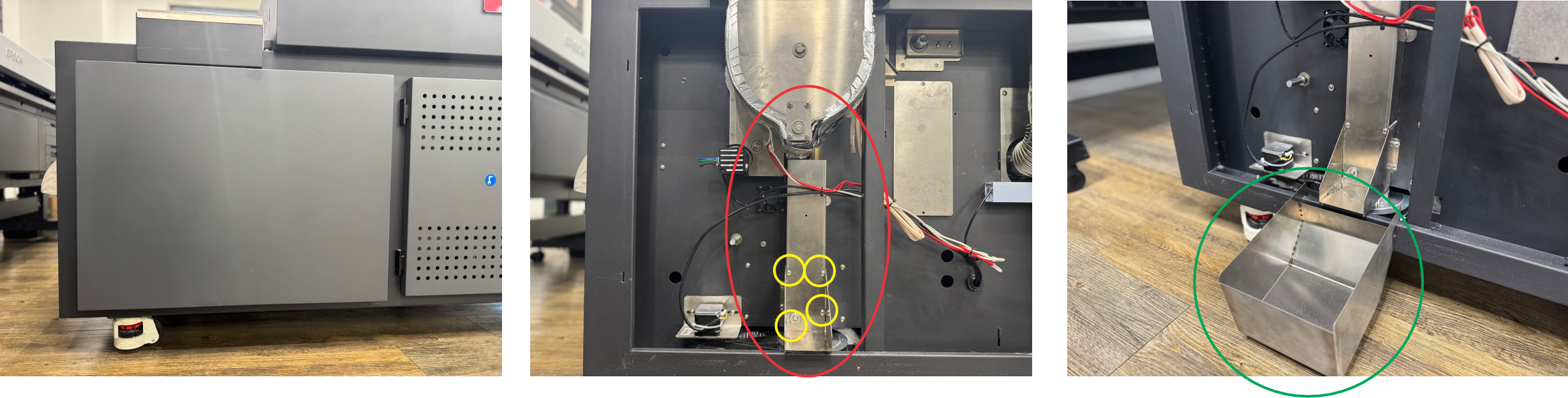
Open the left cover (under the powder hopper) and locate the cover panel (circled in red). Remove the 4 screws (circled in yellow) so you can see the end of the recirculation screw. Fit the powder removal tray (circled in green).
Use the cover panel to move excess powder from the area circled in red into the powder removal tray. At this point, power on the machine and activate the recirculation system (by activating any function, waiting for the system to start, then deactivating the function). Be aware that the lower motor and gear for the recirculation screw will start to turn, keep hands away from any moving components.
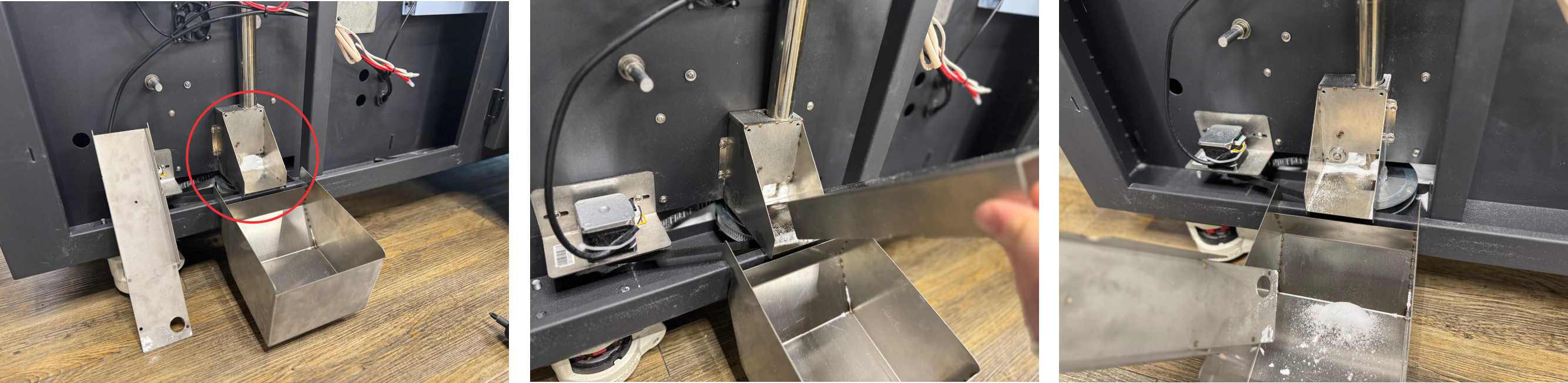
Once there is no more powder coming from the recirculation screw, refit the cover panel and the side cover and assess how much powder is in the powder hopper.
If there is a blockage in the system, you can remove it by removing the powder screws.
Removing the powder recirculation screw
- Slowly pull the recirculation screw out of the channel while slowly rotating it to make it easier.
- Remove any blockages and refit the screw, cover, and motor.
Removing the powder pick up screw
- Locate and remove the powder pick up motor and belt.
- Locate the powder pick up screw gear and remove the grub screws to allow the gear to drop.
- On top of the machine, remove the powder hopper cover and the grate inside.
- Remove the bearing cap bracket at the top of the powder pick up screw.
- The screw should now pull out so you can remove any blockages.
For information on how you can help to keep your Powder Recirculation system working effectively, please see our Powder Recirculation Usage Guide
For further assistance, please contact your Adkins Dealer.
Was this article helpful?
That’s Great!
Thank you for your feedback
Sorry! We couldn't be helpful
Thank you for your feedback
Feedback sent
We appreciate your effort and will try to fix the article