Adkins Powder Recirculation - Usage Guide
TABLE OF CONTENTS
1. Don't exceed the recommended amount of powder for your machine
2. Calibrate the Powder Weight trough to the optimal height for the recirculation system
3. Limit short print runs (Link Mode usage)
4. Allow powder to recirculate even when the machine is not in use
5. Ensure powder is recirculating during the post-use heat cycle
1. Don't exceed the recommended amount of powder for your machine
Too much powder in the recirculation system may cause a blockage in the mechanisms or affect the powder weight trough. To avoid overloading the recirculation system, you should only use the recommended amount of powder in your machine.
900 Pro
- Maximum recommended total amount [2KG]
- Maximum recommended top up increment [1KG]
2. Calibrate the Powder Weight trough to the optimal height for the recirculation system
It's advised to keep the powder cycling through the system quickly to avoid blockages and build ups. One way to help to do this is to calibrate the powder trough to the optimal height* of its maximum travel. Instructions and guidance on calibrating the powder weight trough can be found here.
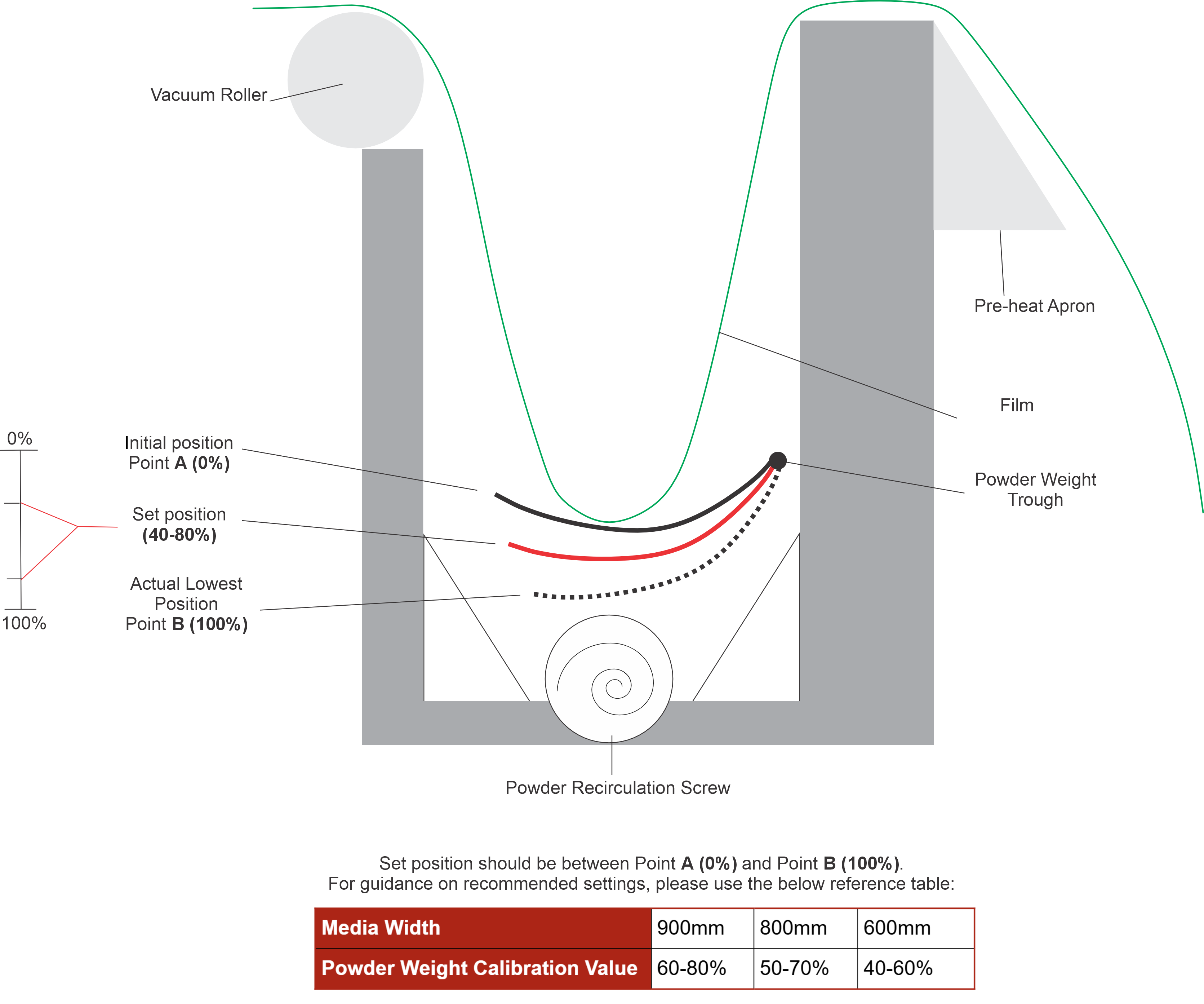
When setting the 'Lowest' value, lower the powder weight trough to a percentage of the total travel before setting the 'Lowest' value. This will help to ensure that powder is always available to dust when required, and allow the system to recirculate what excess powder is dropped from the edges of the film.
* the optimal setting percentage varies on the size of media you are using. Please see below our recommended setting values for the size of media in use.
| Media Width | 900mm | 800mm | 600mm |
| Powder Weight Calibration Value | 60-80% | 50-70% | 40-60% |
3. Limit short print runs (Link Mode usage)
When ending a print run, the powder that is covering the film is dropped into the powder recirculation trough. By limiting the amount of short runs, the recirculation system can sufficiently fill the powder hopper before the next print run; this means that there is always powder ready to dust.
If 2/3 short print runs are ran in reasonably quick succession without allowing the powder to recirculate to the hopper, it may cause a build up in the recirculation trough and not leave enough powder in the hopper to dust effectively.
4. Allow powder to recirculate even when the machine is not in use
When the machine is not in use, it's advised to start the recirculation system to allow the powder to build in the hopper ready for the next print run.
This is also important to help keep the powder dry. The powder hopper is heated which helps to prevent moisture from getting into the powder and to stop the powder from congealing.
To start the powder recirculation process, turn the machine on and activate any function. You should hear and see the powder recirculation screw start to rotate. Once this has been started, you can deactivate the function and allow it to recirculate.
You could use this time to run a prolonged heat cycle by activating 'Heat' and 'Feed'. As advised in the manual, the machine should not be left unattended when in operation.
5. Ensure powder is recirculating during the post-use heat cycle
During the post-use heat cycle, the powder should be recirculating. If you notice that it isn't, activate 'Dusting' briefly; this should restart the recirculation process. You can then deactivate 'Dusting' and continue with the post-use heat cycle as normal.
For more information or further support, please contact your Adkins Dealer.
Was this article helpful?
That’s Great!
Thank you for your feedback
Sorry! We couldn't be helpful
Thank you for your feedback
Feedback sent
We appreciate your effort and will try to fix the article